Trying (and succeeding) to migrate to Ghost 6
You didn't think I'd give up that easily, did you?

It only took me several weeks of sleepless nights, endless hours poring over documentation, endless questions asked to my friend Claude.ai...
Just kidding. After taking a break from the problem, I came back to it with a fresh mind and a more relaxed attitude. Now that I had done a lot of the hard work figuring out the difficult problems last time (fixing the Caddyfile, disabling the email verification requirement, figuring out where the actual files for my content lived) I was feeling way more confident to try tackling this problem again.
If at first you don't succeed…
This time around, I started by taking a full backup of my server and a snapshot for good measure so I could quickly rollback if needed. Then I again followed the official Ghost documentation to get Ghost 6 up-and-running. I instead opted to host my blog at the 'naked' domain level awhiskin.dev rather than the subdomain blog.awhiskin.dev I had been using. This had a cool upside - I could run both instances simultaneously, which made things a LOT easier for migration purposes.
Once I had the second instance running, I then exported all my posts/settings from the old instance, and imported this into the new instance. To me this felt a bit... ugly. It left all the default placeholder posts/pages in place and just lumped my content on top. I decided it would work for now, and I set about trying to fix the broken image references.
To do this, I proceeded to copy my files from the internal Docker directory to the new exposed mount point /opt/ghost/data/ghost/ for the new Ghost 6 instance. Unfortunately, wasn't quite as easy as that - while this fixed a good chunk of the broken image references, it looked like there was a good handful that were still not working. Weirdly, it seemed that the files were actually correctly present on the server, but in the browser I was getting a 404 error.
Hmmm, very weird... I'll come back to this...
After spending a fair bit of time trying to figure this out, I felt there must be a better way to go about this.
…try, try again
This time, I decided a fundamentally different approach. This time, I wanted to migrate not just the content from the old instance, but the entire MySQL database.
After getting some instructions from Claude, it turned out to be incredibly simple. First I needed to enter the Docker container for the database by running docker exec -it ghost-db-1 /bin/bash. Then, I could use mysqldump command to dump the entire database to a ghost_backup.sql file.
mysqldump -u root -p --single-transaction --routines --triggers ghost > /tmp/ghost_backup.sqlFortunately for me, I had Portainer open in my browser and could easily find and enter the MySQL root password. Then I copied the ghost_backup.sql file out of the container onto the host system.
I restored from my snapshot to get back to a clean slate. I reinstalled Ghost from the official guide and got my second instance running. By this stage, it's probably the fifth or sixth time I had done this - I was getting quick at it! 😂
Then, once the second instance was running, I copied the ghost_backup.sql into the database container, performed an import with this command:
mysql -u root -p ghost < /tmp/ghost_backup.sqlAfter a minute or so of churning away, it completed successfully. Then I exited the container, restarted the Docker stack, and once everything was running again, I refreshed the homepage and everything was there! I won't lie, I definitely had a pretty cheesy grin on my face that this worked so seamlessly. Time to migrate the content! Luckily for me I had already saved all my commands to a text file so had it ready to go. After copying the media files across and refreshing the page in my browser... almost everything was working? Weirdly, the thumbails on my homepage were not displaying, yet everything else within the posts was there.
Pain
Remember I said earlier I'd come back to this?
I kept working the problem over in my head. How could this be broken? I'd migrated the database fine, all the content was working - it was just the homepage images that weren't loading! I checked the file permissions on the server, everything looked fine. It didn't make sense why it wasn't working.
Claude even led me on a bit of a goose-chase and gave me some false hope, indicating it was a problem with my Ghost theme. When I switched themes, the images on the homepage suddenly reappeared! But I couldn't figure out a way to "reset" my Ghost theme to prevent the supposed broken links.
Know what it turned out to be? A set of cache rules that I had totally forgotten about in Cloudflare.
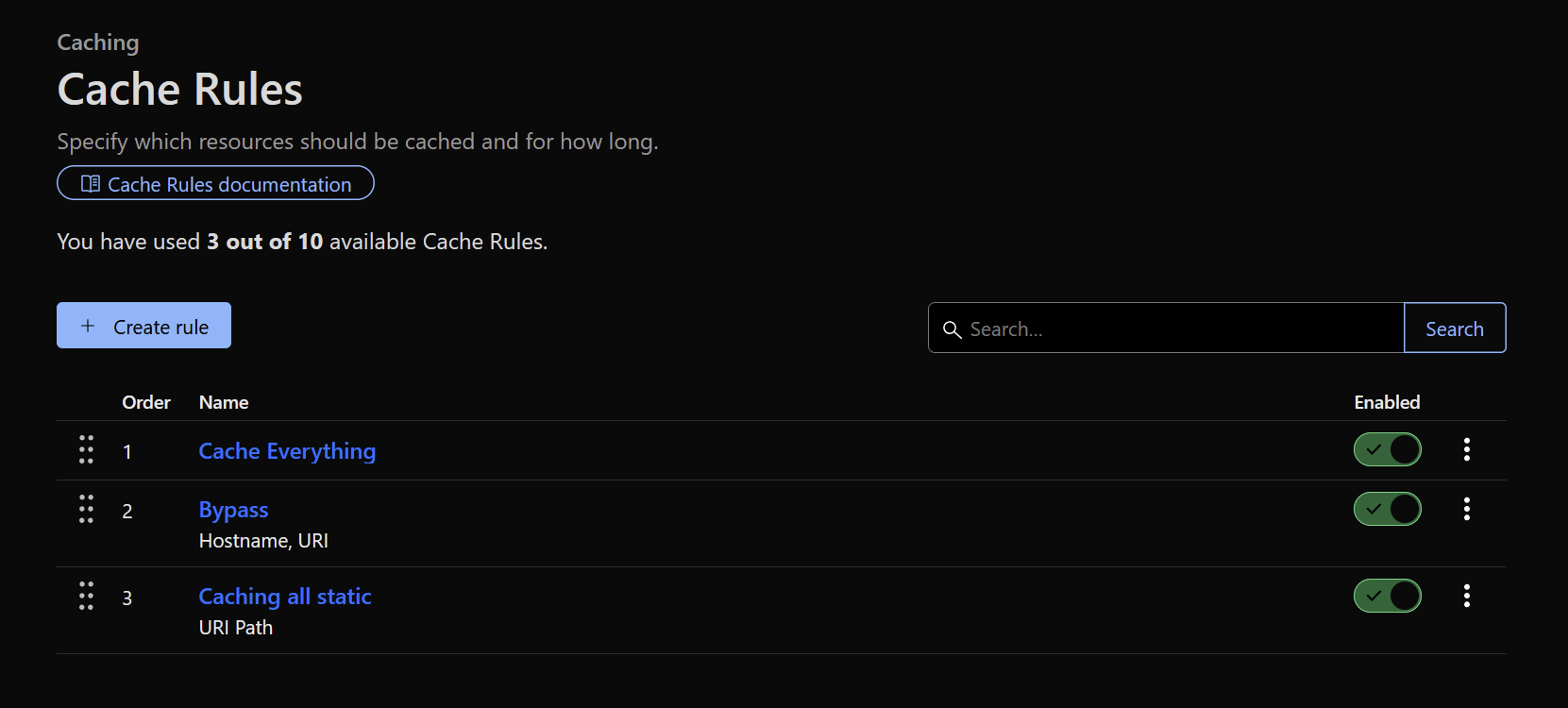
After clearing the cache, toggling the rules and updating the domain names (remember I switched from blog.awhiskin.dev to awhiskin.dev), lo and behold - the images finally worked!
I nearly wept with joy. This process had been so much harder than it needed to be - and it was really my fault for taking the easy route way back when and using a random third-party Github repo with a Docker compose file I didn't take the time to understand.
Anyway, that about sums it up. I'm glad to report the blog is back up and running on the latest version of Ghost, with a simpler URL, and I learned a lot in the process!
If you read this far, cheers - hope you might've learned something too, or at least had a chuckle at my frustrations.